> ## Documentation Index
> Fetch the complete documentation index at: https://dataleap-469bb19d-docs-from-commits-2026-08-19-upload-limits.mintlify.site/llms.txt
> Use this file to discover all available pages before exploring further.
# Use only
> Invite people to chat with your agent without giving them edit access.
**Use only** lets selected people chat with your agent. They cannot change instructions, tools, or triggers. You stay the owner.
Use this when the agent should stay yours, but others need to talk to it.
## Invite people
Ask the agent to invite someone as **Use only**, or do it yourself from the **Share** dialog:
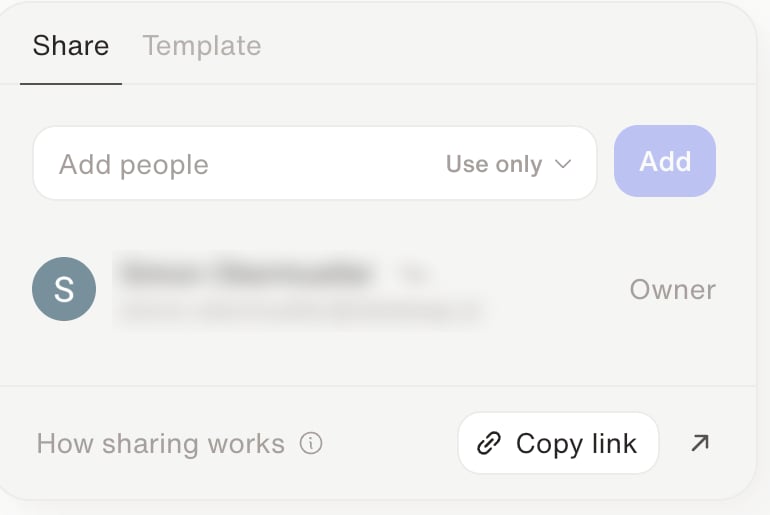 On the agent, click **Share**, then stay on the **Share** tab.
Search under **Add people** and click **Add**. You can only add existing members of your organization who have a Dataleap account — not people from outside it.
You invite individual people, not a whole team or the whole organization.
**Copy link** copies a link to the chat. The link does not grant access by itself — add the person first.
People invited as **Use only** can chat with the agent. Their conversations appear in **Runs**.
## What recipients can do
Recipients see the agent on **Agents** with a **Use Only** badge. They can chat, but only the owner can edit.
On the agent, click **Share**, then stay on the **Share** tab.
Search under **Add people** and click **Add**. You can only add existing members of your organization who have a Dataleap account — not people from outside it.
You invite individual people, not a whole team or the whole organization.
**Copy link** copies a link to the chat. The link does not grant access by itself — add the person first.
People invited as **Use only** can chat with the agent. Their conversations appear in **Runs**.
## What recipients can do
Recipients see the agent on **Agents** with a **Use Only** badge. They can chat, but only the owner can edit.
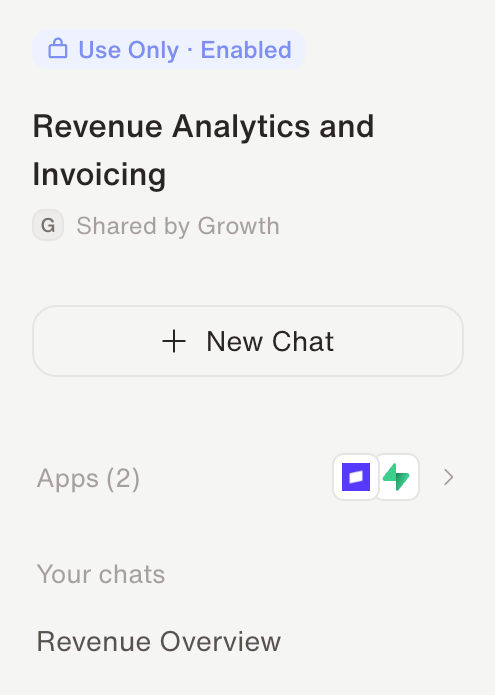 They can start a new chat, continue existing chats, and rename those chats. They cannot edit the agent.
If you disable the agent, they keep existing chats but cannot send new messages. If you remove their access, existing messages stay visible on that page, but they can no longer use the agent.
## Which agents you can share
You can share **any agent** as **Use only** — a personal agent you own, or a team agent in a team you belong to. It's most useful when people need to talk to an agent regularly, not for one-off runs.
Agents cloned from a locked template ("managed" agents) can't be shared this way.
Recipients use *your* agent with *your* connections. **Use only** is not a team agent and not a template. If others need their own copy, share a [template](/share/templates) instead.
## When to choose it
* **Use it** when teammates should talk to the agent, and you want to keep editing it.
* **Promote to a [team agent](/share/team-spaces)** when everyone should see, run, and edit it.
* **Share a [template](/share/templates)** when others should clone the workflow and connect their own apps.
The decision guide across all sharing options.
When the whole team should own the agent.
They can start a new chat, continue existing chats, and rename those chats. They cannot edit the agent.
If you disable the agent, they keep existing chats but cannot send new messages. If you remove their access, existing messages stay visible on that page, but they can no longer use the agent.
## Which agents you can share
You can share **any agent** as **Use only** — a personal agent you own, or a team agent in a team you belong to. It's most useful when people need to talk to an agent regularly, not for one-off runs.
Agents cloned from a locked template ("managed" agents) can't be shared this way.
Recipients use *your* agent with *your* connections. **Use only** is not a team agent and not a template. If others need their own copy, share a [template](/share/templates) instead.
## When to choose it
* **Use it** when teammates should talk to the agent, and you want to keep editing it.
* **Promote to a [team agent](/share/team-spaces)** when everyone should see, run, and edit it.
* **Share a [template](/share/templates)** when others should clone the workflow and connect their own apps.
The decision guide across all sharing options.
When the whole team should own the agent.